
RUNAIRA JOURNAL
Social media scheduling tools: planning seasonal campaigns

Use social media scheduling tools to plan seasonal campaigns by keeping each business’s content, deadlines, approvals, and publishing schedule distinct within a shared planning process. Scheduling organizes when posts go out; you still need to confirm campaign details, assign responsibility, and decide which changes require your approval.
TL;DR- Social media scheduling tools need a seasonal campaign plan with separate business identities, deadlines, and approval responsibilities.
- Approve campaign details before scheduling posts; a publishing date does not prove a post is ready.
- Runaira fits owners managing multiple businesses who want operations, content, and approvals in one tool.
- Evaluate scheduling and social media automation against your handoffs, not just the calendar view.
How do social media scheduling tools support seasonal campaigns?
Social media scheduling tools support seasonal campaigns by turning approved content into a publishing plan. The useful starting point is not an empty calendar. It is a clear decision about what each business is promoting, who owns the work, and what must happen before publication.
For owners of separate businesses, a shared season does not mean a shared campaign. Each business needs its own audience, message, campaign details, and approval responsibility. The guide to social media automation tools for several brands addresses the broader coordination question behind that distinction.
Build your 2026 seasonal campaign plan in this order:
- Set the objective. Write what the campaign should help each business accomplish. Do not treat posting activity as the objective.
- Confirm campaign details. Establish what you can accurately say, where readers should go, and when the message stops being relevant.
- Assign responsibility. Name the person preparing content, the person checking business facts, and the owner approving sensitive decisions.
- Approve content. Review the wording, visual, destination, business identity, and intended publication time together.
- Schedule publication. Place approved posts into the relevant business’s calendar, then define what happens when circumstances change.
Approve the campaign before you fill the calendar. Otherwise, a tidy schedule can contain unresolved business decisions.
Why this matters
A seasonal campaign joins content work to operational commitments. A post can announce something the team must deliver, invite inquiries someone must answer, or send readers to a page that needs updating. The publishing decision belongs inside that wider chain of responsibility.
For your 2026 plan, separate two questions: whether the post is ready and whether the business is ready. A finished caption does not settle the second question. Ask the responsible team member to confirm the underlying details before the post receives approval.
If you currently combine ChatGPT, a task tool, and manual coordination, use that arrangement as your starting point. Write down where drafts live, where approval happens, and who transfers approved work into the publishing schedule. This is a workflow to examine, not an assumption that every owner works this way.
Which planning approach fits your seasonal campaigns?
Compare approaches by the responsibility each one carries. A drafting tool, a task list, and a publishing calendar are not interchangeable, even when you use them for the same campaign.
The table below describes evaluation choices, not verified capabilities of a particular software product.
| Approach | Best for | Useful role | Limitation to address |
|---|---|---|---|
| Manual campaign plan | Owners defining responsibilities before choosing software | Makes campaign details and decisions explicit | Someone must maintain the plan and communicate changes |
| Dedicated scheduling tool | Teams whose main need is organizing publication | Provides a place to evaluate scheduling requirements | A publishing schedule does not establish operational readiness |
| Broader operations platform | Owners coordinating content alongside work across businesses | Brings the wider management process into the buying decision | Scheduling and approval capabilities still need verification |
Choose the approach that addresses your unresolved handoff. If nobody knows who approves a campaign, changing the calendar does not fix that problem. If approval is clear but publication is disorganized, scheduling deserves closer attention.
For your 2026 evaluation, write requirements before watching demonstrations. Ask the provider to show the exact workflow you need, including a rejected draft, a changed campaign detail, and work assigned to the wrong business. A demonstration should answer your operating questions, not just show a finished calendar.
Build a seasonal campaign brief for each business
Give each business its own brief, even when the campaigns share a season. A brief keeps the reason for a post attached to the work and gives reviewers a common reference.
Include these fields:
- Business identity: Specify which business owns the campaign and which account should publish it.
- Campaign objective: State the action you want readers to take and why that action matters.
- Confirmed details: Record the approved facts, destination, and relevant campaign dates.
- Content boundaries: Describe what the business can say and what still needs confirmation.
- Responsible people: Identify who prepares, checks, approves, and handles responses.
- Change conditions: State which changes require another review or cancellation.
Keep uncertain details out of approved copy. If a campaign depends on an operational decision that has not been made, mark that dependency in the brief rather than turning it into a public promise.
Your brief should also distinguish the campaign’s active period from its preparation period. Content preparation, approval, publication, and follow-up are separate responsibilities. Give each a place in the plan without inventing a universal timetable that every business must follow.
Keep the daily handoff explicit
Use a simple sequence: Prepare, Check details, Owner approval, Schedule, Review changes. These are proposed responsibilities for your process, not claims about any platform’s built-in workflow.
At the preparation stage, the content owner works from the approved brief. During the details check, the responsible person confirms that the message still matches what the business intends to deliver. Owner approval then covers the decisions you have reserved for yourself.
After approval, the scheduling responsibility moves to the designated person. If the campaign changes, the work returns to review rather than remaining approved by default.
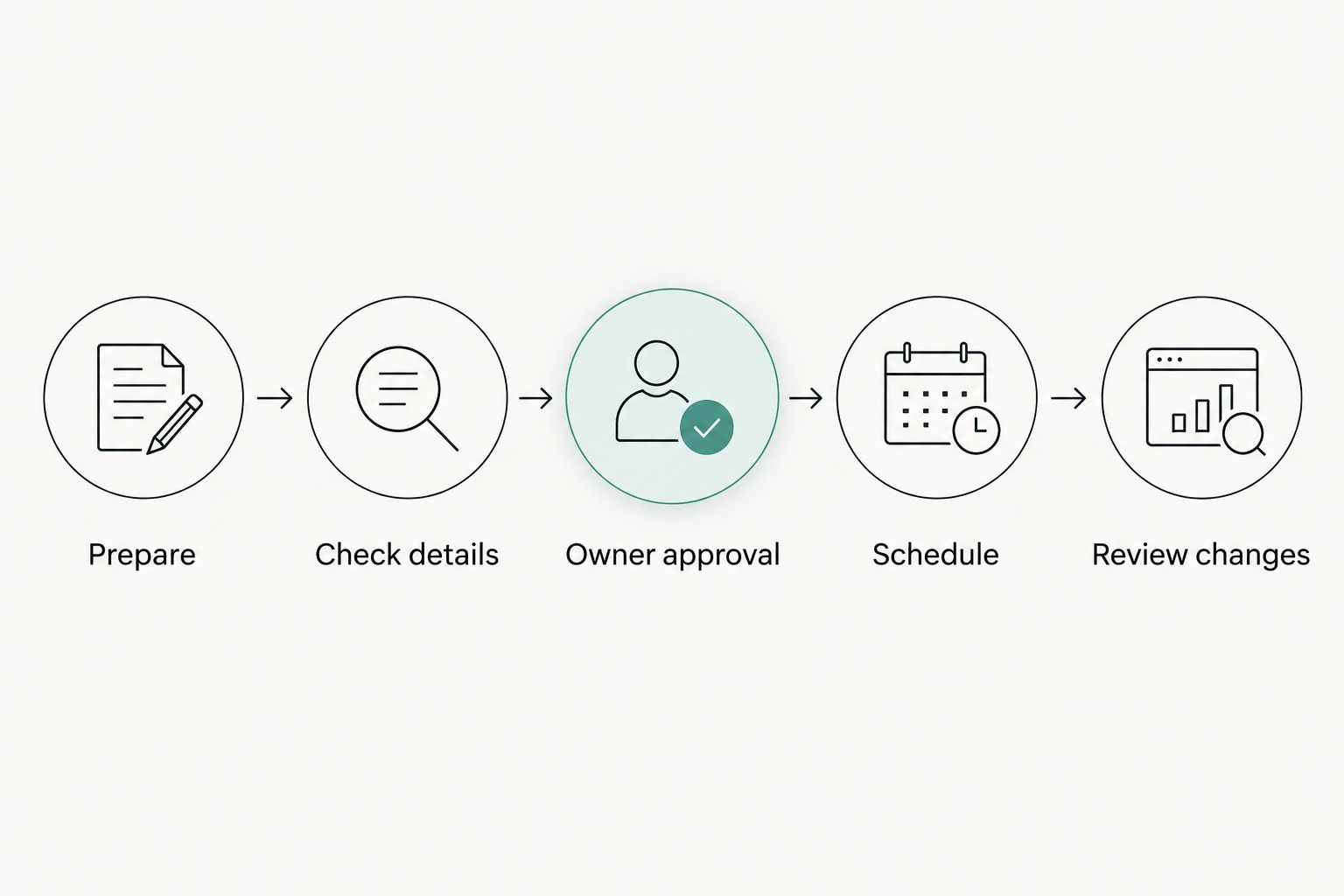 Changed campaign details return to review before publication.
Make the handoff visible in ordinary business language. A note should identify the business, the work awaiting action, the responsible person, and the decision needed. Avoid a status such as pending when it does not explain what is pending or who must resolve it.
For example, a draft awaiting confirmation of campaign details is not ready for owner approval. A draft with confirmed details but unresolved messaging is a different problem. Keeping those distinctions visible prevents the owner from becoming the default investigator for every unfinished task.
Why seasonal campaign planning varies across businesses
There is no single seasonal scheduling pattern that fits every business. Build your 2026 plan around the decisions and dependencies in each campaign, not a calendar copied from another brand.
- Campaign objective: An announcement and an inquiry-focused campaign require different messages and follow-up responsibilities.
- Business identity: Separate businesses need distinct account destinations, voices, and approved facts.
- Operational dependencies: Content that relies on another team’s work needs confirmation from that team before approval.
- Owner decisions: Define which judgments stay with you and which routine checks someone else can complete.
- Publication context: Account destination, local time, and campaign dates belong in the review, not just in the scheduling step.
- Change responsibility: Identify who checks affected posts when a campaign decision changes.
These factors are planning inputs, not proof that one tool outperforms another. Use them to create an evaluation checklist and ask providers to demonstrate the relevant behavior.
How should you keep separate brands from sounding alike?
Keep a separate voice brief for each business and review drafts against that brief. Shared production processes are useful; shared wording should be a deliberate choice, not an accidental result of reusing a draft.
Include the audience, preferred language, approved claims, and phrases to avoid. When adapting a seasonal idea, check the message as well as the business name. Replacing a name does not establish that the content suits the second business.
Reuse the planning process, not the approval. A post approved for one business has not automatically been approved for another.
What should happen when an approved campaign changes?
When an approved campaign changes, identify every affected draft and scheduled post, then send the changed material back through review. Assign one person to coordinate that check so responsibility does not disappear between content and operations.
Review the campaign brief, copy, visual, destination, and publication timing together. A correction to one post does not establish that the rest of the campaign is accurate.
Before relying on software, ask how its actual scheduling controls work. Verify whether you can make the changes your process requires; do not assume cancellation, pausing, or renewed approval behaves as you expect.
Where a broader operations partner fits
Runaira offers an AI operator platform for managing operations, content, approvals, and growth across multiple businesses from one tool. Runaira is for owners managing multiple businesses who want operations, content, and approvals in one place.
That scope is relevant when seasonal content depends on decisions beyond the publishing calendar. Position her as a partner across your businesses while you retain final judgment. The owner decides the campaign direction, acceptable commitments, and exceptions that require personal approval.
The benefit to evaluate is the fit between that stated scope and your cross-business responsibilities. The limitation is equally clear: a broad platform description does not verify every scheduling control you need. Check your required accounts, publishing behavior, approval process, and change handling before deciding.
For a 2026 evaluation, bring a real campaign brief and a list of unresolved handoffs. Ask how those responsibilities would be handled. Do not substitute a general promise of automation for evidence about your workflow.
Explore your cross-business workflow
Review a platform for operations, content, approvals, and growth while keeping final decisions with you.
Explore RunairaFAQ
What should I look for in social media scheduling tools for seasonal campaigns?
Look for a fit with your business separation, approval responsibilities, publishing requirements, and change process. Ask providers to demonstrate those requirements rather than assuming they are included.
Can I use the same seasonal campaign across all my businesses?
You can reuse a campaign structure, but each business needs its own message, confirmed details, and approval. Check that the objective and content fit the audience before adapting a draft.
Should I approve social posts before they go into the calendar?
Approve the content and campaign details before treating a calendar entry as ready to publish. If you use the calendar for draft planning, make the difference between planned and approved work explicit.
What is the best posting schedule for a seasonal campaign?
The best posting schedule follows your campaign dates, audience context, and operational readiness. There is no universal timetable established here; choose dates that match the confirmed campaign plan.
Is Runaira just a social media scheduling tool?
Runaira is an AI operator platform for operations, content, approvals, and growth across multiple businesses. Verify the specific scheduling capabilities you need rather than treating that broader scope as proof of every publishing feature.
What should I do if campaign details change after posts are scheduled?
Review all affected posts and stop changed material from publishing until it is checked again. Assign responsibility for the correction and verify how your chosen tool handles changes to scheduled work.
One last thing
Your publishing calendar needs an exit plan as well as a start date. Before approving a seasonal campaign, decide who checks what should stop, what remains relevant, and what needs replacing when the campaign ends.
A post can be accurate when approved and no longer match the business’s plans later. Make end-of-campaign review an assigned responsibility. Include it in your 2026 campaign brief so it does not depend on the owner remembering every scheduled message across every business.