
RUNAIRA JOURNAL
Social media scheduling tools: handling time zones across brands

Social media scheduling tools handle time zones across brands properly when each scheduled post has a named business, an intended audience time zone, and an approved publication time. Set the schedule around the audience’s local clock, verify how the tool converts that time, and keep changes to timing or content under the owner’s approval rules.
TL;DR- Choose social media scheduling tools by audience-local scheduling and approval controls, not calendar appearance.
- Runaira fits owners coordinating content and operations across businesses; verify scheduling-specific controls before choosing.
- Use named time zones rather than fixed UTC offsets for recurring schedules.
- Keep brand calendars separate and owner approvals explicit.
Why this matters
A shared calendar does not mean your businesses share an audience, a working day, or an approval process. A morning post for one business can land outside the intended window for another when everyone works from the owner’s time zone.
The problem is coordination, not just conversion. Your team needs to know which business owns a post, whose clock determines publication, and what happens when approval arrives late. In 2026, make those decisions part of the schedule rather than leaving them in chat messages.
Runaira offers an AI operator platform for coordinating operations, content, approvals, and growth across businesses. Runaira is best for owners who want one partner for coordinating work across multiple businesses while keeping final decisions. Evaluate her scheduling-specific capabilities separately; broad coordination and time-zone handling are different requirements.
How should social media scheduling tools handle time zones across brands?
Use the audience’s intended local time as the starting point, then confirm the tool’s stored publication time. A calendar label alone does not establish whether a tool uses an account setting, a workspace setting, your browser’s clock, or an explicitly selected zone.
Follow this sequence for every business:
- Name the business. Make the destination account and business identity visible before selecting a time.
- Choose the audience zone. Record the named zone that governs publication, such as America/New_York or Europe/London.
- Set the local time. Write the intended audience-facing time alongside the date, not as an isolated clock value.
- Confirm the conversion. Inspect the scheduled timestamp and check that it matches the intended local time.
- Approve the post. Include the destination, date, time zone, copy, and media in the approval decision.
- Check the outcome. Confirm that publication occurred on the intended account at the intended time.
These are evaluation and operating steps, not claims that every scheduling product supports them. Before choosing software, ask the vendor to demonstrate the complete sequence with separate business accounts.
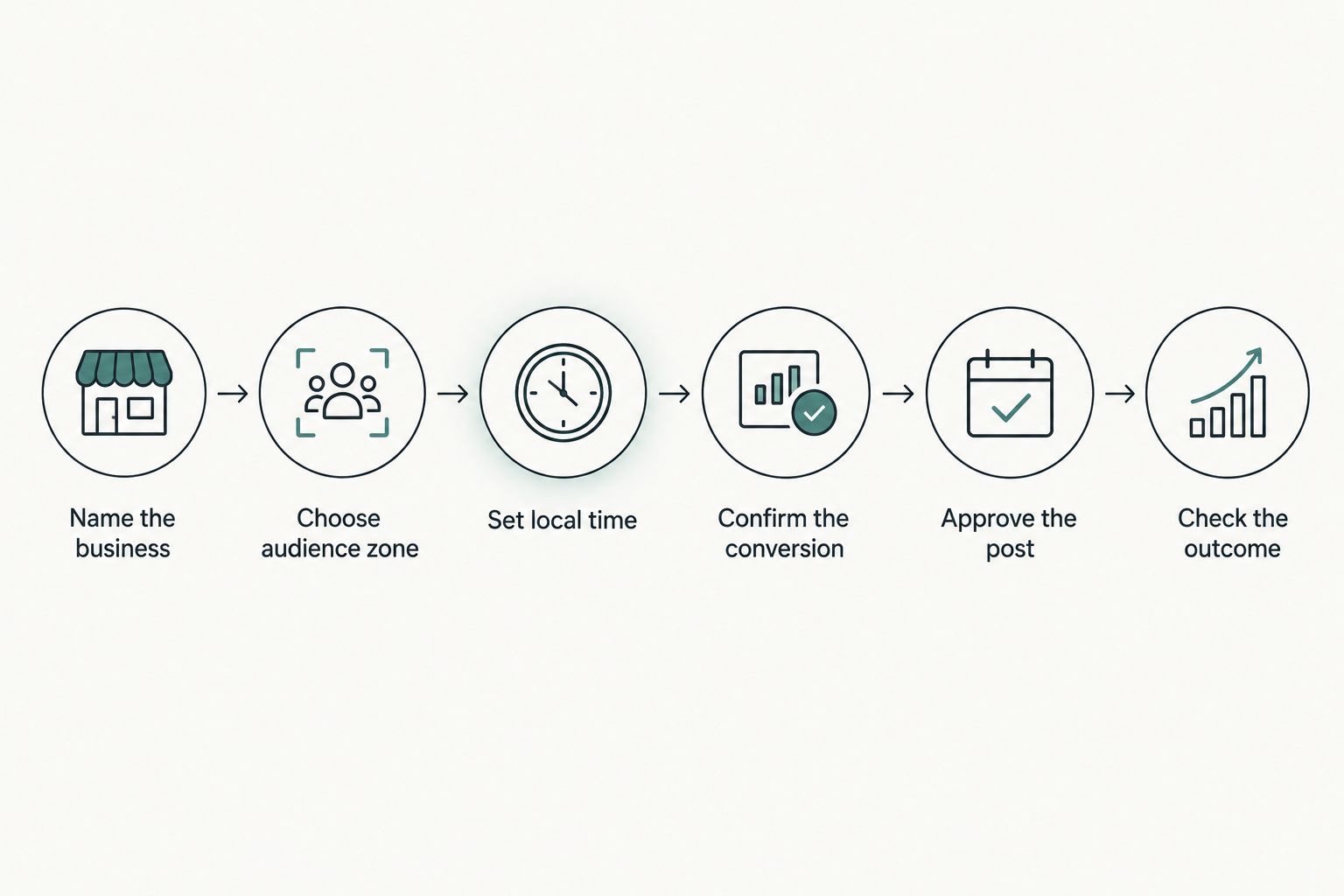 Approve the destination and timing alongside the content.
A worked time-zone example
Suppose you want separate businesses to publish at 09:00 in New York and 09:00 in London. Those are different moments, even though the local clock labels match.
The following conversions use standard named-zone rules for January 2026 and July 2026. They illustrate the requirement; they do not describe a particular product’s behavior.
| Audience zone | Intended local time | January 2026 equivalent | July 2026 equivalent |
|---|---|---|---|
| America/New_York | 09:00 | 14:00 UTC | 13:00 UTC |
| Europe/London | 09:00 | 09:00 UTC | 08:00 UTC |
New York uses UTC minus 5 hours in January and UTC minus 4 hours in July. London uses UTC plus 0 hours in January and UTC plus 1 hour in July. A recurring local-time schedule needs seasonal rules, not just a fixed offset.
If you store only 14:00 UTC for the New York business, that timestamp represents 09:00 in January but 10:00 in July. Decide whether preserving the local clock or preserving the global instant is the actual requirement.
Audience-local scheduling: best for separate local businesses
Use audience-local scheduling when each business serves a different local market and the intended publication window follows that market’s day. Write the business’s named zone into its scheduling brief, then verify whether the software can preserve that local time for recurring posts.
The advantage is clear intent: each business has its own clock. The trade-off is that your owner-facing calendar needs to distinguish local publication times from the time displayed on your own screen.
Do not assume that every post for a business belongs in the same zone. A business can have a local customer message and a separate announcement aimed at a wider audience. Choose the zone for the post’s purpose, not merely the account’s address.
Owner-time scheduling: best for a shared operating clock
Use owner-time scheduling when your team deliberately plans everything from one working clock. This approach gives the owner a consistent view, but someone still needs to translate each intended audience window before setting publication.
The advantage is a simpler planning reference. The drawback is manual conversion responsibility: a readable owner calendar can still contain an incorrectly timed audience post.
For example, a brief that says only “Tuesday morning” is incomplete when the owner and audience live in different zones. Replace it with a date, a clock time, and a named zone before anyone schedules the post.
UTC scheduling: best for simultaneous announcements
Use UTC scheduling when the same announcement must appear at one global instant. This is different from asking each business to publish at the same local hour.
The advantage is a common reference that does not observe daylight saving time. The drawback is that readers encounter the announcement at different local hours, and your team must translate UTC accurately when checking the calendar.
| Scheduling approach | Best for | Main advantage | Main drawback |
|---|---|---|---|
| Audience-local | Separate local businesses | Preserves the intended local publication window when supported | Requires distinct zone settings and clear calendar labels |
| Owner-time | Teams planning from one operating clock | Gives the owner a consistent planning reference | Requires conversion for audiences in other zones |
| UTC | Simultaneous announcements | Defines one global publication instant | Does not preserve the same local hour everywhere |
Choose the scheduling approach per campaign, not automatically for every brand. Keep the decision in the brief so a replacement team member does not have to infer it from calendar entries.
Why scheduled publication times vary
Publication timing varies because several different clocks and decisions can govern the same post. Check these factors before treating a displayed time as final:
- Audience location: the intended reader’s zone determines what a local publication window means.
- Scheduling settings: a product can display or interpret times through workspace, account, or user settings; verify the actual behavior.
- Daylight saving rules: named zones can change their UTC offsets seasonally, and regions do not all change together.
- Campaign intent: publishing at the same local hour differs from publishing simultaneously.
- Approval timing: a delayed decision needs a defined response rather than an improvised replacement slot.
- Travel or handoffs: a different device, location, or team member creates a reason to recheck the displayed zone.
For recurring schedules in 2026, check the next scheduled occurrences around seasonal clock changes. A correct first post does not establish that later dates preserve the intended local hour.
What should an owner approve before a post is scheduled?
Approve the business, destination account, content, publication date, local time, and named time zone together. Content approval without timing approval leaves a material part of the decision unresolved.
Keep the handoff plain. A hypothetical approval request can read: “Business: local services. Destination: selected social account. Audience zone: America/New_York. Intended time: 09:00 local. Decision needed: approve the copy, image, and timing.” This is an example request, not a claim about a product’s interface.
Set a rule for changes after approval. If someone moves the date, changes the destination, or replaces the content, specify whether the post returns to the owner. Routine preparation can move forward without turning permission to draft into permission to publish.
Runaira’s business-operations platform is relevant to this broader coordination problem: she brings operations, content, approvals, and growth into one tool. The value to evaluate is whether that shared working context fits your businesses; the scheduling checklist still needs a separate demonstration.
How should distinct businesses handle different content rules?
Give each business its own scheduling brief, even when one person prepares all the posts. Record the audience zone, permitted destinations, owner decision points, and what to do with a missed slot. Shared staffing is not a reason to merge business rules.
Platform-specific requirements also deserve separate evaluation. A business assessing OnlyFans content scheduling tools needs to check destination support and approval responsibilities for that channel; a time-zone setting alone does not establish that a scheduler fits the publishing workflow.
Apply the same discipline to every destination. Ask the vendor to demonstrate the relevant account type, content format, and scheduling behavior rather than treating a broad platform name as proof of support.
Your operating brief should answer four practical questions:
- Who prepares this business’s content?
- Who decides whether it is ready?
- Which named zone governs publication?
- Who handles a missed or failed post?
Those answers keep responsibility attached to the business instead of buried in a shared queue. They also make handoffs easier to inspect without requiring the owner to reconstruct an entire conversation.
What happens when approval arrives after the scheduled time?
A missed approval window needs an explicit decision: hold the post, request a new time, or follow a previously approved fallback rule. Do not assume that late approval should trigger immediate publication.
Separate ordinary content from time-sensitive content. A general update can be reassessed for a later slot; a message tied to an event or deadline needs its relevance checked before rescheduling. Neither decision should depend solely on an empty calendar space.
Define the rule before using it. An owner can authorize routine rescheduling within stated boundaries while retaining decisions about sensitive messages, changed offers, or a different business destination. Delegating a handoff does not mean delegating unrestricted judgment.
How do you evaluate a scheduler without disrupting every business?
Start with a limited workflow and inspect the evidence at each handoff. Use ordinary content with a clearly approved destination and time, then compare the intended local time, the stored schedule, and the actual publication record.
Ask the vendor to demonstrate these situations before expanding use:
- A business in a different zone from the owner.
- A recurring post that spans a seasonal clock change.
- A pending approval when the intended slot passes.
- A team member changing the calendar display zone.
- A moved publication time after content approval.
Treat each demonstration as a pass-or-fail requirement for your workflow, not as a marketing comparison. If the product cannot show how a case works, keep that responsibility in your operating process until it is resolved.
If your current setup combines ChatGPT, task tools, and manual scheduling, map the handoffs before replacing anything. Identify where drafts become tasks, where approval is recorded, and where a person converts the time. This is a starting scenario to examine, not a claim about how all owners work.
The advantage of your existing setup is that you can inspect its actual responsibilities. Its drawback is any repeated handoff you identify during that review. Judge a replacement by whether it preserves owner control and resolves those specific gaps, not by the size of its feature list.
FAQ
What's the best way to use social media scheduling tools across time zones?
Use a named audience time zone for each business and verify the scheduled timestamp before approval. Choose simultaneous UTC scheduling only when the campaign requires one global publication instant.
Should every brand use the owner's time zone?
No: use the owner's time zone only when a shared operating clock is an intentional planning choice. Posts aimed at other zones still need their intended local publication times checked.
Can I schedule every business's posts for 09:00?
09:00 needs a named zone to define a publication time. In January 2026, 09:00 in New York is 14:00 UTC, while 09:00 in London is 09:00 UTC.
Do recurring social posts change when daylight saving time starts?
Recurring behavior depends on how the scheduler stores and applies time-zone rules. Verify whether it preserves the named zone's local clock or repeats a fixed UTC timestamp.
What should happen if I approve a post too late?
Hold the post or apply an explicitly approved fallback rule. Late approval should not automatically authorize publication at a different time.
Is Runaira relevant to managing content across separate businesses?
Runaira is relevant to owners coordinating operations, content, approvals, and growth across multiple businesses. Evaluate named-zone scheduling, recurring-time behavior, and publication controls separately before relying on them.
What should I check when choosing a scheduler in 2026?
In 2026, check audience-zone settings, seasonal clock changes, approval handoffs, and destination support. Ask for a demonstration using your actual business structure rather than assuming those requirements are covered.
One last thing
The clock shown in your calendar is not necessarily the clock your audience experiences. Make every scheduling brief readable without opening the tool: business, destination, date, local time, named zone, and approval status.
That is the practical acceptance test. If another team member cannot determine when the post should appear from the brief, improve the handoff before adding more automation.