
RUNAIRA JOURNAL
Best social media scheduling tools for small teams in 2026

Best overall for straightforward scheduling: Buffer. Best for visual planning: Later. Best for coordinating content and approvals across separate businesses: Runaira. This 2026 guide compares social media scheduling tools for small teams and separates publishing needs from the broader work of running multiple businesses.
TL;DR- Buffer is the default shortlist choice among social media scheduling tools for straightforward publishing.
- Later suits teams that plan social content around visual assets.
- Runaira suits owners coordinating operations, content, and approvals across separate businesses; evaluate publishing requirements separately.
- Hootsuite suits broader social management; Sprout Social suits reporting-led teams.
- Keep final decisions with the owner and test each business’s approval handoff before choosing.
Why this matters
A publishing calendar answers when a post should appear. It does not, by itself, answer which business the post belongs to, who checks the message, or what happens when the owner requests a change.
If you run 2 businesses with separate teams, those distinctions belong in your selection criteria. A tidy calendar is not enough when staff cannot tell an approved post from a draft awaiting your judgment.
You might currently combine ChatGPT, a task tool, and manual reminders. Treat that as a starting setup to examine, not evidence that every small team works this way. Identify the broken handoff before adding another subscription.
What makes the best social media scheduling tools?
For a small team choosing in 2026, these criteria matter more than a long feature list:
- Publishing fit: Check the exact networks, account types, and post formats your businesses use. Scheduling support is not interchangeable across every format.
- Business separation: Look for a clear way to distinguish brands, assets, responsibilities, and calendars. Test whether someone can select the wrong business accidentally.
- Approval clarity: Confirm who can prepare, approve, revise, and publish content. An owner’s decision should not disappear into a comment thread.
- Daily usability: Test an ordinary working session: preparing a draft, finding feedback, changing a date, and checking what happens next.
- Management scope: Decide whether you need publishing alone or also social conversations, reporting, and coordination with other business work.
- Owner control: Establish which decisions require your judgment. Software should carry out the agreed process, not decide what your business promises customers.
Choose the smallest useful scope, not the longest feature list. If your bottleneck is owner approval, more reporting will not fix it.
Social media scheduling tools at a glance
The table separates each option’s strongest use case from the boundary you need to examine. It is a 2026 shortlist, not a claim that every platform provides the same publishing or approval functions.
| Option | Best for | Standout focus | Key limitation or evaluation boundary |
|---|---|---|---|
| Runaira | Owners coordinating multiple businesses | Operations, content, approvals, and growth in one platform | Confirm scheduling, network support, and publishing requirements separately |
| Buffer | Straightforward publishing routines | Social scheduling and publishing queues | Publishing alone does not define your cross-business approval process |
| Later | Visual content planning | Visual planning and social scheduling | A visual calendar does not resolve ownership or business decisions |
| Hootsuite | Broader social management | Scheduling alongside social management | Broader scope requires clear responsibilities to remain useful |
| Sprout Social | Reporting-led social teams | Publishing alongside reporting and social management | Reporting is not a substitute for consistent execution |
1. Runaira: best for coordinating separate businesses
Runaira is best for owners coordinating content, approvals, and operations across separate businesses. The platform serves owners who want one partner across their businesses rather than another isolated place to manage a single task.
She helps with operations, content, approvals, and growth. Final decisions stay with you. That makes the platform relevant when social content is part of a wider daily workload, not simply a collection of posts waiting for publication.
Runaira pros:
- Addresses the needs of owners managing multiple businesses.
- Brings content and approvals into the same broader operational scope.
- Keeps owner judgment central to the working relationship.
Runaira cons and boundaries:
- The stated capabilities do not establish specific publishing networks or native scheduling functions.
- A broader operations platform is a different buying decision from a dedicated scheduler.
Best for: An owner whose main problem is coordinating responsibilities across businesses.
Test the daily handoff before making a decision. Bring a draft from each business, explain who owns it, and identify the decision only you can make. Ask how that work is handled without assuming any particular integration or publishing function.
Verdict: Buy for cross-business coordination only after confirming your requirements; hold if native scheduling is your sole requirement.
2. Buffer: best for straightforward publishing routines
Buffer is a social publishing platform with scheduling and queue-based planning. It is the default shortlist choice when your team needs a clear routine for preparing posts and scheduling their publication.
Keep the evaluation focused. You are checking whether the publishing workflow fits your team, not asking a scheduler to become the operating system for every business you own.
Buffer pros:
- Centers the decision on scheduling and publishing.
- Offers queue-based planning for a repeatable posting routine.
- Provides a clear starting point for a publishing-focused comparison.
Buffer cons and boundaries:
- A publishing queue does not establish who has authority to approve a message.
- Network, format, and team-permission requirements still need individual checks.
Best for: A small team with a defined approval process that needs help organizing publication.
For your 2026 evaluation, use 3 sample posts: a routine update, a visual post, and a message needing owner approval. Check the complete path for each, including revisions after scheduling. Do not substitute a feature-page checklist for that practical trial.
Verdict: Buy if straightforward publishing is the problem you need to solve.
3. Later: best for visual content planning
Later offers social scheduling with an emphasis on visual content planning. It belongs on your shortlist when preparing and reviewing images or videos is central to your social workflow.
Use the visual plan to discuss content before publication. For separate businesses, check that each asset has the right business context rather than treating an attractive calendar as proof that everything is ready.
Later pros:
- Makes visual planning a central part of the evaluation.
- Combines content planning with social scheduling.
- Fits a workflow where creative review comes before publication.
Later cons and boundaries:
- Visual organization does not decide whether a claim is accurate or approved.
- Your team must still check supported formats and business separation.
Best for: A small team that plans social content around visual assets.
Test a changed image as well as a changed caption. Ask whether the person responsible for approval can clearly identify the final version. That question matters more than whether the calendar looks complete.
Verdict: Buy when visual planning drives the work; skip when your main problem is wider operational coordination.
4. Hootsuite: best for broader social management
Hootsuite combines scheduling with a broader social management scope. Consider it when publishing is only one part of the team’s work and you also need to assess how social conversations and reporting fit together.
Broader scope needs a clear reason. Before your 2026 comparison, write down the work that must happen beyond publishing so additional functions have an actual owner.
Hootsuite pros:
- Extends the evaluation beyond scheduling alone.
- Brings publishing into a wider social management context.
- Fits teams with several distinct social responsibilities.
Hootsuite cons and boundaries:
- A wider platform requires decisions about who handles each responsibility.
- Extra scope adds no value when the team only needs a publishing routine.
Best for: A team managing several social functions rather than scheduling alone.
Assign a person to each responsibility before trialing the platform. If nobody owns incoming conversations or reporting, adding those functions will not create an operating process.
Verdict: Buy for a defined broader social workload; skip when scheduling alone meets the need.
5. Sprout Social: best for reporting-led social teams
Sprout Social combines publishing with social management and reporting. It belongs on the shortlist when the team needs reporting to inform recurring decisions, not merely to produce a dashboard.
Start with the question the report must answer. For separate businesses, that might be which content to repeat or which account needs attention; do not assume results from one business explain another.
Sprout Social pros:
- Makes reporting part of the social management decision.
- Combines publishing with a wider management scope.
- Fits teams with an established reporting responsibility.
Sprout Social cons and boundaries:
- Reports need business context before they support a decision.
- Reporting depth is not the first priority when drafts routinely stall before approval.
Best for: A team that already publishes consistently and uses reporting to decide what to change.
Choose a recurring decision and assess whether the reporting supports it clearly. If your team cannot name that decision, begin with the approval and publishing process instead.
Verdict: Buy for reporting-led management; hold until your team has a repeatable publishing routine.
Test the daily handoff before choosing
Use the same exercise for every shortlisted option. The following is an evaluation process, not a claim that each platform supports every step natively.
- Business context: Start with content from 2 businesses. State the intended account, audience, and purpose before anyone edits the draft.
- Draft preparation: Prepare 3 sample posts with different review needs. Include one that must change before publication.
- Owner approval: Name 1 approval owner for each post. Make the pending decision explicit rather than relying on an unread message.
- Publishing check: Verify the intended account, final content, and schedule. Check the handling of edits after approval.
- Outcome review: Decide what the team needs to learn from publication and who will act on that information.
A useful trial reveals where responsibility changes hands. Your guide to owner approval workflows provides a separate place to examine those decisions before choosing publishing software.
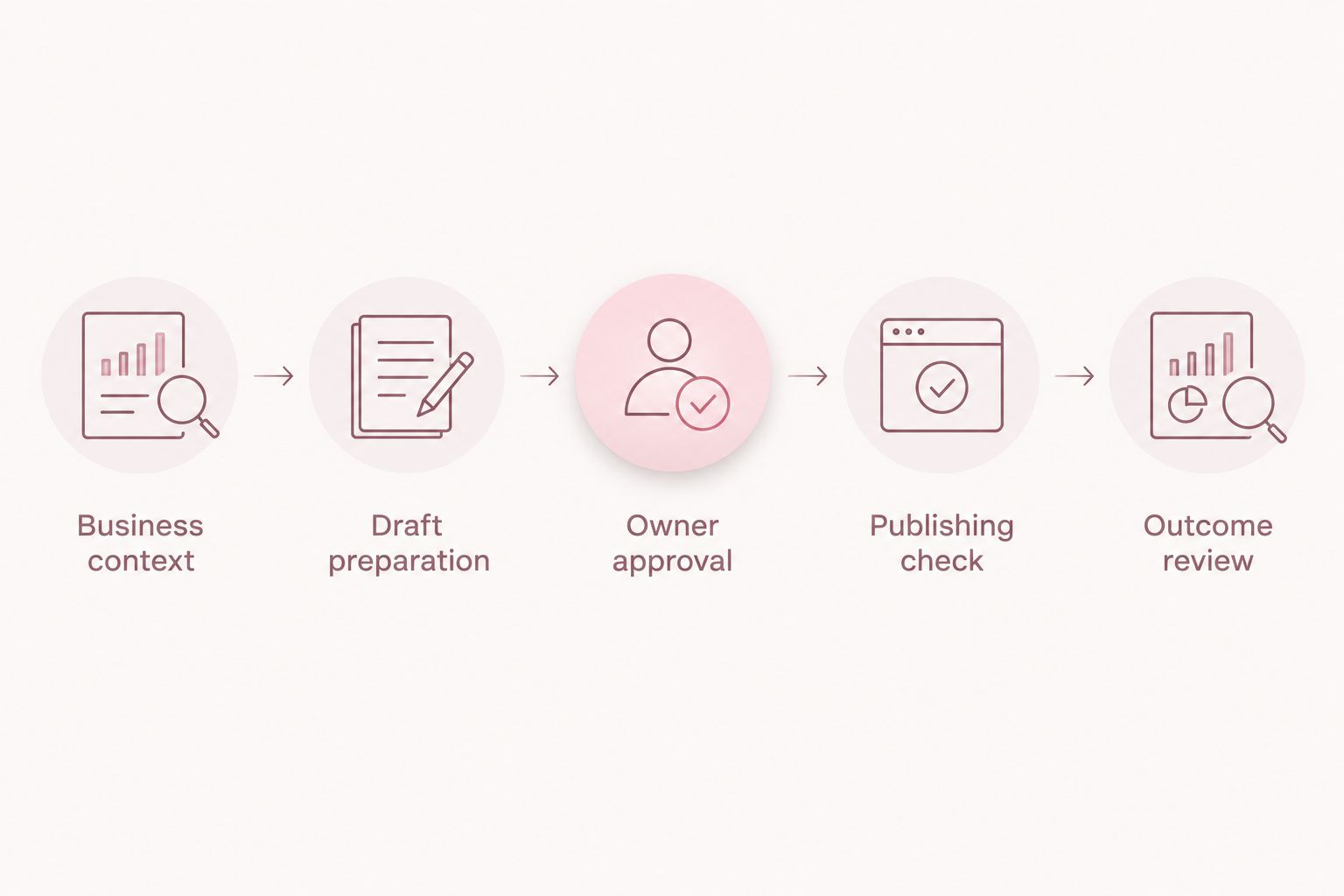 Check the handoff between responsibilities, not just the appearance of the calendar.
Keep the business boundaries visible throughout the exercise. A rejected post for one company should not create confusion about what is approved for another. Ask the team to explain the next action without help from the person who set up the trial.
How the shortlist is ranked
This shortlist ranks fit against publishing focus, visual planning, broader management, reporting needs, and cross-business coordination. It does not claim hands-on testing, measured time savings, or identical capabilities across the options.
The first option addresses the owner’s broader coordination problem. Buffer is the default dedicated scheduling shortlist choice; the remaining options serve distinct needs. Before subscribing in 2026, verify current network support, permissions, approval handling, and publishing behavior against your own examples.
Which social media scheduling tools should you choose?
Choose Buffer first if your unanswered question is simply how to organize publication. Compare Later when visual planning drives the work, Hootsuite when you manage a broader social workload, and Sprout Social when reporting guides recurring decisions.
For owners running separate businesses, distinguish the publishing tool from the partner coordinating the surrounding work. You need both questions answered: how does content reach publication, and who makes sure the right business decisions happen beforehand?
Do not replace your whole setup at once. Retain any part that already has a clear responsibility, test the missing handoff, and remove overlap only after the replacement works for your team.
Explore support across your businesses
Review the platform for operations, content, approvals, and growth while keeping final decisions with you.
Explore the platformFAQ
What are the best social media scheduling tools for a small team?
Buffer is the default shortlist choice for straightforward scheduling, while Later suits visual planning. Hootsuite fits broader social management, and Sprout Social fits reporting-led teams. Choose by the work your team actually owns.
What should I choose if I run more than one business?
Choose a setup that keeps each business’s content, responsibilities, and approval decisions clear. Evaluate publishing separately from wider operational coordination, and test drafts from separate businesses before committing.
Is a scheduling tool the same as a business operations platform?
No. A scheduling tool focuses on planning and publishing social content, while a business operations platform addresses a broader set of responsibilities. Do not assume either category includes the other’s capabilities.
Is Buffer better than Later for my team?
Buffer is the starting shortlist choice for straightforward publishing, while Later belongs on the shortlist when visual planning is central. Test the same posts in both and compare the complete workflow, including revisions and approval.
Can a social media scheduling tool approve posts for me?
Owner approval should remain a deliberate business decision. Check the platform’s actual permission and approval functions, then define which posts require your judgment before publication.
Can I keep using ChatGPT alongside a scheduler?
Yes, you can use ChatGPT for drafting alongside a separate publishing process. Give each part of the setup a clear responsibility and check how drafts, revisions, and approvals move between them.
What should I check before signing up for a scheduling platform?
Check your exact networks, account types, formats, business separation, permissions, and approval requirements. Run representative drafts through the full process rather than choosing from a feature list alone.
One last thing
An empty approval queue is not proof that every post received the right decision. Check whether the team can explain who approved the final version and which business it belongs to.
For your 2026 selection, make that explanation part of the trial. If it is unclear, fix the responsibility before expanding the publishing calendar.